Self-hosted
StreamZH runs on your own computer or server. Library, accounts and settings live in one data folder that you control and back up.
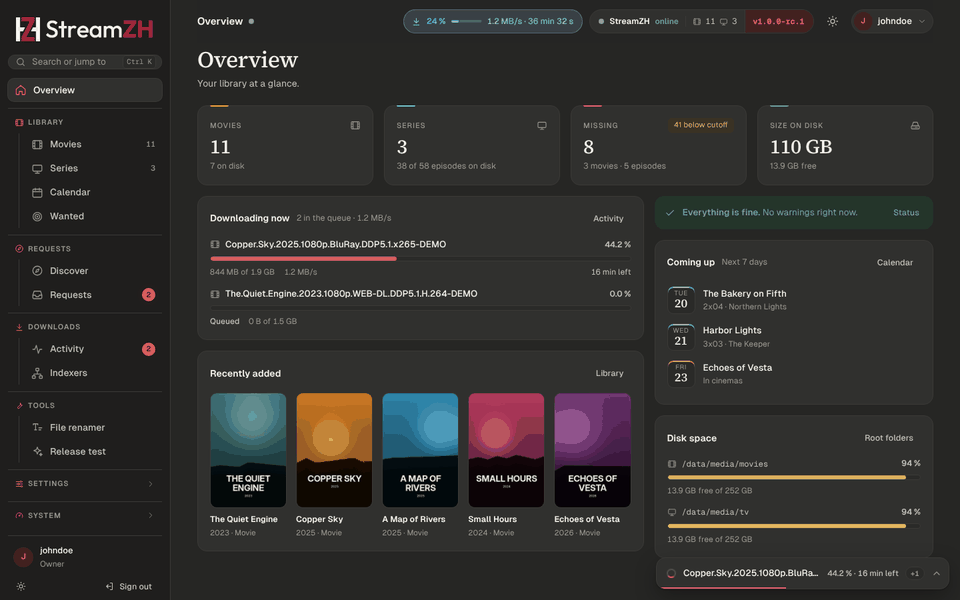
StreamZH finds, downloads, repairs, unpacks, renames and files your movies and series, and lets friends request what they want to watch. Self-hosted, free and open source.
Replaces
One login, one database, one queue, one API.
Library
Titles, posters and episode lists come from TMDB. Monitor per movie, series or season, with standard, daily and anime numbering and TheXEM scene mapping. Bring the folders you already have and StreamZH picks them up as they are.

Search and downloads
A Usenet engine with backup servers, categories and a scheduler repairs with par2 and unpacks with 7-Zip on its own. The built-in torrent engine seeds to your goals, or you keep qBittorrent, Transmission or Deluge. One queue follows every release from grab to import.

Quality
Quality profiles with groups and a cutoff, custom formats with scores, release profiles and size limits per quality. StreamZH syncs the TRaSH Guides templates daily, which is what Recyclarr does, built in.
recyclarr.yml
Requests
Discover shows what is trending, popular, upcoming and top rated. Friends request what they want; you approve, or let trusted people auto-approve within their limits. The built-in Discord bot answers /movie, /tv and /requests.

Moving over
The migration wizard takes over Radarr, Sonarr, Prowlarr and SABnzbd through their APIs: settings, profiles, custom formats, indexers, Usenet servers, download clients and your library with the files you already have, linked where they are.

Get started
After you create the owner account, Get started lists the six things StreamZH needs and ticks each one off from your real configuration. Most of them you finish right on the page.

Security and privacy
StreamZH runs on your own computer or server. Library, accounts and settings live in one data folder that you control and back up.
No usage data, crash reports or analytics. StreamZH talks to TMDB, your indexers, servers and clients, the services you connect, the TRaSH Guides and TheXEM, and to GitHub when you check for updates.
A fresh install can only be claimed on the server or with a one-time setup code. Stored passwords and API keys are encrypted, and StreamZH writes only inside the folders the owner allows.
This website sets no cookies, runs no analytics and loads nothing from other servers. Fonts and images come from streamzh.com itself.
Install
The native packages are self-contained: no .NET runtime to install. Every release lists a SHA256SUMS file to check the downloads against.
Windows 10 (1809 or later), Windows 11 or Windows Server 2019 or later, x64.
Download StreamZH-<version>-win-x64-setup.exe from the latest release.
Run it (administrator rights needed). It installs to C:\Program Files\StreamZH, keeps your data in C:\ProgramData\StreamZH and runs StreamZH as a Windows service with a tray icon, or with the tray icon only if you prefer.
Open http://localhost:9797 and create the owner account.
Silent installation
StreamZH-<version>-win-x64-setup.exe /VERYSILENT /TASKS="service,firewall,cfa" /FOLDERS="D:\Media;D:\Downloads"Prefer no installer? A portable StreamZH-<version>-win-x64.zip is on the same page. Windows details
Any Linux with systemd, x64 or arm64. StreamZH runs as the service streamzh under its own user.
Download the .deb or .rpm from the latest release. On 64-bit ARM (for example a Raspberry Pi 4 or 5) pick the arm64 / aarch64 file.
Install it:
# Debian, Ubuntu
sudo apt install ./streamzh_<version>_amd64.deb
# Fedora, RHEL
sudo dnf install ./streamzh-<version>.x86_64.rpm
# openSUSE
sudo zypper install ./streamzh-<version>.x86_64.rpmGive the user streamzh access to your media and download folders:
sudo setfacl -R -m u:streamzh:rwX -m d:u:streamzh:rwX /data/media /data/downloadsOpen http://<server>:9797. The setup code for the owner account is in the journal:
sudo journalctl -u streamzh | grep -i 'setup code'Any other distribution with systemd
tar -xzf StreamZH-<version>-linux-x64.tar.gz
sudo bash StreamZH-<version>-linux-x64/install-linux.shLinux details: install script options, permissions, service commands.
The image ghcr.io/streamzh/streamzh is built for amd64 and arm64 and includes par2, 7-Zip and ffprobe.
Save this as docker-compose.yml. Set PUID and PGID to the owner of your media (id -u, id -g).
services:
  streamzh:
    image: ghcr.io/streamzh/streamzh:latest
    container_name: streamzh
    restart: unless-stopped
    environment:
      PUID: "1000"
      PGID: "1000"
      UMASK: "027"
      TZ: "Etc/UTC"
    ports:
      - "9797:9797"            # web interface
      - "51414:51414"          # built-in torrent engine (only when you use it)
      - "51414:51414/udp"
    volumes:
      - ./config:/config
      - /data/media:/data/media
      - /data/downloads:/data/downloads
    security_opt:
- no-new-privileges:trueStart it and read the one-time setup code from the log:
docker compose up -d
docker logs streamzhOpen http://<server>:9797, enter the setup code and create the owner account.
Release candidates are tagged by version only and never move latest: until 1.0, use the version tag from the latest release instead of latest. Docker details: docker run, paths, reverse proxies.
Apple silicon and Intel. StreamZH runs in a Terminal window.
Download StreamZH-<version>-osx-arm64.zip (Apple silicon) or StreamZH-<version>-osx-x64.zip (Intel) from the latest release.
Unpack it, remove the download quarantine once (the app is not notarized by Apple) and start it:
cd ~/Downloads
unzip StreamZH-<version>-osx-arm64.zip
xattr -dr com.apple.quarantine StreamZH
./StreamZH/StreamZHOpen http://localhost:9797 and create the owner account.
Install ffmpeg (for example with Homebrew) for media info; par2 and 7-Zip are installed by StreamZH. macOS details
Then follow Get started in the app, or read the installation guide for reverse proxies, updates and backups.
FAQ
Yes. StreamZH is free and open source software under the GNU General Public License v3.0. The source code, issues and releases are on GitHub.
That is the idea: library, indexers, a Usenet engine, a torrent engine, TRaSH Guides sync and requests live in one app with one login and one queue. You can still use qBittorrent, Transmission or Deluge as the download client, and you keep watching in Plex, Jellyfin, Emby or Kodi, which StreamZH updates when something new arrives.
Yes. Settings → Migration takes over Radarr, Sonarr, Prowlarr and SABnzbd: settings, profiles, custom formats, indexers, servers, download clients and your library with its files, which stay where they are. The old apps are only read, and side-by-side mode lets both run until you switch. See the migration guide.
Windows 10 (1809 or later), Windows 11 and Windows Server 2019 or later (x64), Linux with systemd (x64, arm64, as .deb, .rpm or .tar.gz), Docker (amd64, arm64) and macOS (Apple silicon and Intel).
In one data folder on your machine: C:\ProgramData\StreamZH on Windows, /var/lib/streamzh with the Linux packages, /config in Docker and ~/Library/Application Support/StreamZH on macOS. Updates replace the program only, scheduled backups run every 7 days, and your media folders are never part of a backup or touched by an uninstall.
No. It sends no usage data, crash reports or analytics anywhere. It only connects to TMDB, your indexers, Usenet servers and download clients, the services you connect, the TRaSH Guides and TheXEM, and to GitHub when you check for updates.